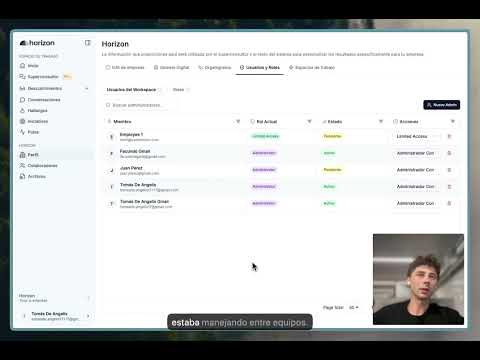
Workspaces let you divide Horizon the way your organization is divided: by area, country or unit, with real data separation between each one. Each team works in its own space and sees only what belongs to it. Leaders who need the full picture get a consolidated view. Permissions are defined separately: which data you see is set by your workspace; what you can do is set by your role.
The problem
Separating one area's data from another's used to mean running two Horizon companies: two logins, two setups, no shared view. Workspaces do it inside a single organization, with a consolidated view for whoever needs the full picture.
How it's structured
Company is the full organization, and also where anything cross-cutting lives. Workspaces are partitions defined by the company (by area, country or unit), and every piece of operational data lives in exactly one. Roles define what a person can do; workspaces define which data they can do it to.
Company
The full organization, and the home for anything that cuts across every area.
Workspaces
Partitions defined by the company. Each piece of operational data belongs to exactly one of them.
Roles
What a person is allowed to do, defined separately from which data they reach.
Two independent questions
- Which data can a person reach?
- The workspaces assigned to them
- What can they do with that data?
- What their role allows
What a workspace is
A workspace is a container with a name and a description. Horizon never forces it to be an area or a country. Each organization picks the dimension that matches how it actually runs.
By function
Finance, Marketing, IT, HR.
By country or operation
Argentina, Uruguay, Brazil.
By plant or site
Carrasco, Laguna del Sauce.
By intersection
IT and Carrasco, P&C and Carrasco, when separation is needed across two dimensions at once.
Workspaces are flat. They do not nest and there are no sub-workspaces. When separation is needed across two dimensions, intersection workspaces cover it.
Where data lives
A piece of data lives in exactly one place: a workspace or the Company level. Never in both.
Lives in a workspace
Discovery Cycles, Conversations
Insights
Processes
Initiatives
Plans
Files, documents and Superconsultant conversations
Lives at the Company level
The collaborator list. An employee exists once and is referenced from every workspace they take part in
The Slack integration. One install per organization
The credit balance, with the option to set a cap per workspace
Roles
Two roles cover most cases. When all or nothing is too coarse, custom roles cover the rest.
Core roles
Company admin
Every workspace plus the Company level
Full access. Create workspaces, invite people, assign roles, launch discoveries and see all data without anonymization.
Workspace admin
Their own workspaces only
Full access inside their workspaces. No access to other workspaces or to Company level data. One person can be workspace admin of several workspaces; their access is the union of all of them.
Custom roles
A role can be assembled from about 30 granular permissions: viewing Insights, editing Processes, launching Deep Dives, reading Conversations, managing collaborators, and more. Custom roles can be created at the organization level (across every workspace) or at the workspace level (only there).
Four editable starter templates
Operator
Needs to see everything without changing anything
Broad read access to Insights, Conversations, Tasks, Initiatives, Pulses and Plans. Can trigger Deep Dives.
Limited access
Area leaders who need results, not the raw detail
Read access to the dashboard, Insights, Tasks, Highlights, Discovery Cycles and Deep Dives. No access to Conversations. Ships with anonymization on.
Subject matter expert
Validates the process map
View, edit and validate Processes.
Implementation lead
Executes Initiatives
Initiatives, Insights, Discovery Cycles, Processes and Tasks.
Who can grant access
A company admin can create workspaces, create roles and invite anyone with any role.
A workspace admin can add members to their workspace with custom roles scoped to that workspace, but cannot create another workspace admin and cannot create new workspaces.
Managing roles and access cannot be delegated. A custom role can never include it, so access administration stays at the organization level.
Anonymization
Horizon can show employee data without identifying the people behind it. Area leaders see what is being reported without attributing it to a specific person.
Anonymization is a property of the role. It is turned on when defining a custom role, and everyone with that role sees employee data without identities. The Limited access template ships with it on.
An anonymized role also has no access to raw Conversations or to the collaborator list. The two were designed together.
Company admins are never anonymized.
Credits per workspace
On top of the organization's credit balance, each workspace can get a consumption cap as a percentage of the total. One area cannot spend another area's budget, and finance gets predictable spend per unit.
People across areas
An employee exists once in the organization and is referenced from every workspace they take part in. People are never duplicated.
Someone splitting time between Supply Chain and Quality Control joins discoveries on both sides without being treated as two different individuals.
A collaborator's profile looks different depending on where it is viewed from. From the Finance workspace, only their Finance participation is visible. From the consolidated view, everything is. That keeps the separation real.
Examples
Four common structures, and the workspace layout that fits each one.
Structure
Large multi-area company
Setup
One workspace per division (Finance, Marketing, Risk, IT), with the consolidated view for the transformation director.
Structure
Multi-country company
Setup
One workspace per country. Regional leads get access to the countries they cover.
Structure
Multi-site operation
Setup
One workspace per site, or one per site and department intersection when separation is needed across both dimensions.
Structure
Pharma with regulated areas
Setup
One workspace per area, with Limited access roles for leaders who see results without reaching Conversations.
FAQ
Why it matters
No more separate accounts per area. One Horizon account, multiple workspaces, connected data when you need it. If your company was operating with separate accounts by area, our team can help you consolidate everything into a single account without losing any data.
Keep exploring
Connect this product to the bigger Horizon workflow
Jump back to the main platform overview, read the discovery framework behind Horizon, or see how our engineering team makes AI execution work in practice.
Horizon platform overview
See how discovery, prioritization, and delivery connect across the full product experience.
View platformOrganizational discovery guide
Read the framework behind continuous discovery, stakeholder interviews, and evidence-backed transformation plans.
Read guideAI-ready codebase guide
Learn how Horizon made its codebase easier for AI tools to understand, plan, and implement against.
Read articleWorkspaces, custom roles and anonymization are already available in your Horizon account.
Explore Workspaces